Bottom line
- What is IPTV? It is live television delivered through your broadband connection instead of a satellite dish, an aerial, or a cable line.
- How it works: channels stream from your provider’s servers to an app on your device in small chunks, the same way films stream online.
- What you need: a device made after 2018, a stable 25 Mbps connection for 4K (10 Mbps for HD), and a subscription with login details.
- Why it costs less: no dish, no engineer visit, no hardware rental. You pay for the streams and that is the whole bill.
- Is it legal? The technology is. What matters is the provider’s licensing, and you can check the basics in two minutes before paying.
What Is IPTV? The Plain-English Definition
IPTV stands for Internet Protocol Television. Strip out the jargon and the answer to what is IPTV fits in one sentence: your TV channels arrive through the same broadband line that carries your email and video calls. No dish on the wall, no engineer at the door.
The confusion usually starts with streaming apps. An on-demand film app gives you a library to browse. IPTV gives you live channels with a programme guide, so it feels like normal telly, just delivered differently. Most complete services bundle both: live channels plus an on-demand library behind one login.
I have set this up on everything from a £30 stick to a ten-year-old plasma with a box hanging off the back. The technology is never the hard part. Knowing what you are actually buying is, and that is what the rest of this guide sorts out.
How IPTV Works: From Server to Your Screen in 4 Steps
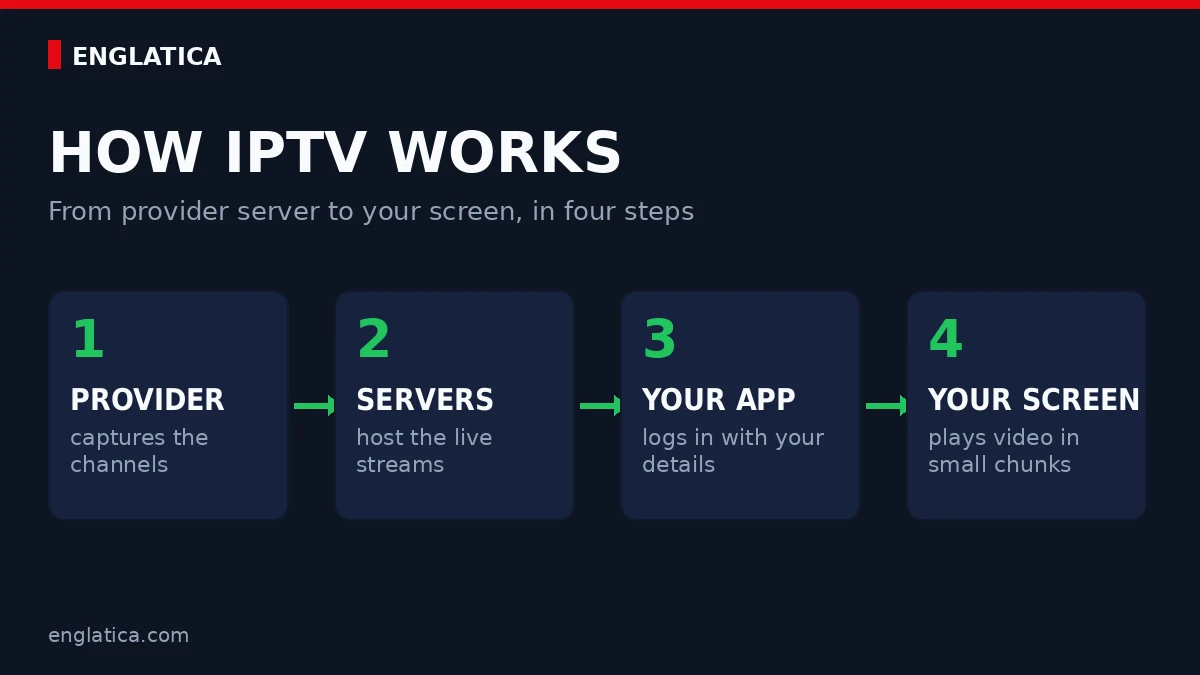
- The provider captures the channels. Broadcast feeds come in from studios and satellites, then get converted into a stream format your device can read.
- The streams sit on distribution servers. Good providers spread channels across many servers so one busy match cannot choke the whole service. This is the biggest difference between providers, and you cannot see it on a price list.
- Your app logs in. You receive a username, a password, and a server address (often called Xtream Codes), or a playlist link known as an M3U file. Enter them once and your channel list loads.
- Video arrives in small chunks. Your device downloads a few seconds ahead of what you watch. On a stable connection the buffer stays invisible. On weak Wi-Fi, you meet the spinning wheel.
The whole chain takes under a second on a healthy connection. When something breaks, it is almost always step 2 (an overloaded server) or step 4 (your Wi-Fi). Remember that split, because it makes troubleshooting fast.
IPTV vs Satellite vs Cable vs Streaming Apps (Compared)
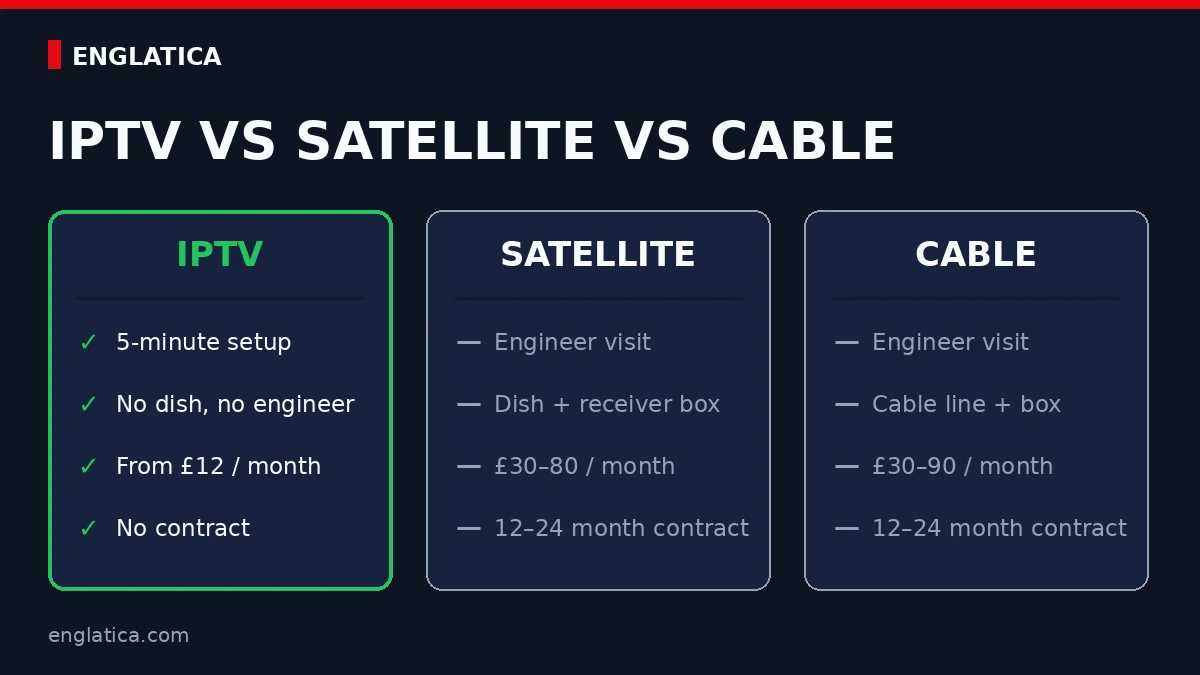
Here is how the four options stack up on the things people actually ask about.
| IPTV | Satellite | Cable | Streaming apps | |
|---|---|---|---|---|
| Delivery | Your broadband | Dish on the wall | Physical cable line | Your broadband |
| Hardware | Any smart device or a cheap stick | Dish plus receiver box | Set-top box | Any smart device |
| Setup time | About 5 minutes | Engineer visit | Engineer visit | About 2 minutes |
| Live channels with a guide | Yes, usually thousands | Yes, fixed packages | Yes, fixed packages | Rarely, and limited |
| Typical monthly cost | £10–15 | £30–80 | £30–90 | £5–15 each, and they stack |
| Contract | Usually none, rolling monthly | 12–24 months | 12–24 months | Monthly |
The pattern is hard to miss. Traditional TV charges you for infrastructure: the dish, the box, the van outside your house. IPTV skips all of it, which is why the price gap looks too good to be true when it is really just a shorter supply chain.
3 Myths That Muddy the Answer
Ask five people what is IPTV and you will hear at least one of these. All three are wrong.
- “IPTV means illegal streaming.” No. IPTV is a delivery method, and licensed broadcasters around the world use it every day. Legality depends on the provider, never on the technology itself.
- “You need to be technical.” If you can install an app and type a password, you can run IPTV. Full setup takes about five minutes.
- “Cheap means poor quality.” Price reflects infrastructure, not picture. A £12 plan can outperform a £70 package because none of your money goes on vans and dishes.
The 3 Types of IPTV (Ranked by How Often You’ll Use Them)
- Live TV. Channels in real time with an electronic programme guide (EPG). Sport, news, live events. This is why most people switch.
- Catch-up TV. Rewind the schedule and watch what aired earlier today or this week. Useful when kick-off happened during the school run.
- Video on demand (VOD). A built-in library of films and series you pick manually, like a streaming app living inside your IPTV service.
A complete IPTV subscription includes all three behind one login. If a provider offers live channels with no catch-up and no VOD, that is a thin service in 2026 and you can do better.
What You Need to Start: The Tested 4-Item Checklist
- A device. Any modern screen works: a smart TV, a streaming stick, an Android box, a phone, a laptop. If you are buying new, the best devices for IPTV cost £30–60 and outlast most TVs’ built-in apps.
- An app. Your provider tells you which player to install. Most services use a handful of well-known IPTV players, and installation takes two minutes.
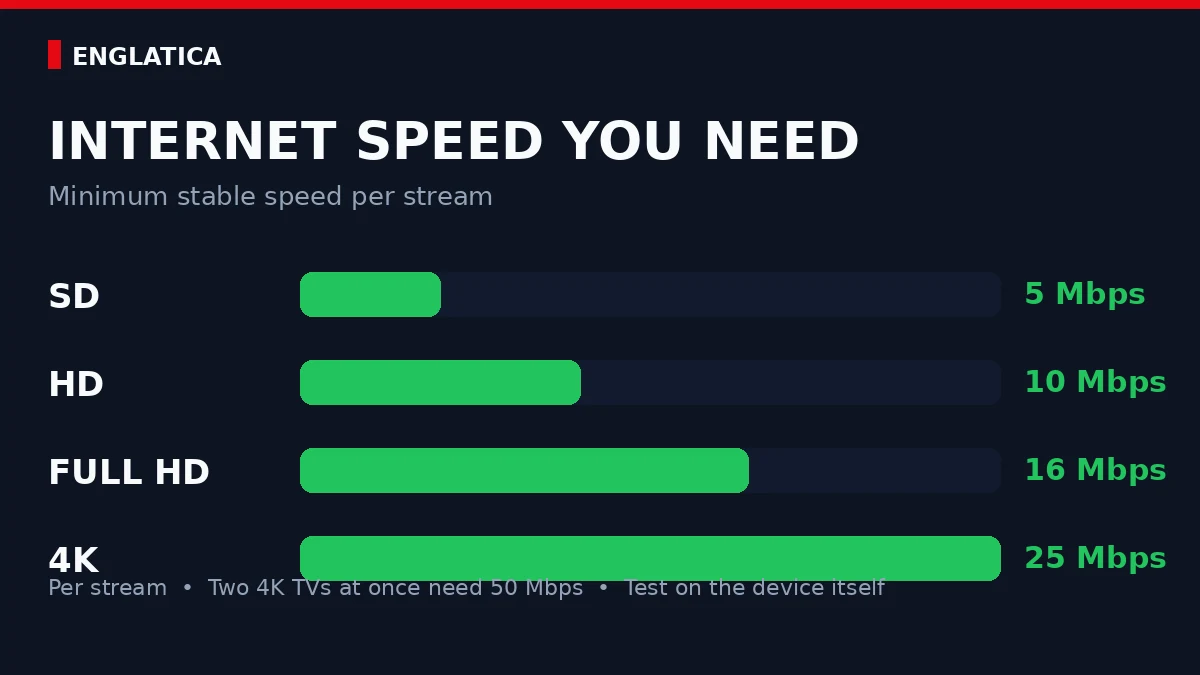
- Enough internet speed. The table below shows the minimum stable speed per stream. Wi-Fi loses real-world speed through walls, so test on the actual device, not on a phone sat next to the router.
- A subscription. Login details arrive within minutes of paying. From there, our IPTV setup guide takes you from credentials to a working channel list in about five minutes.
| Picture quality | Minimum stable speed |
|---|---|
| SD | 5 Mbps |
| HD | 10 Mbps |
| Full HD | 16 Mbps |
| 4K | 25 Mbps |
Those numbers are per stream. Two TVs watching 4K at the same time need 50 Mbps between them.
First-Week Problems and Instant Fixes (Proven)
New setups hit the same five snags. Here is the symptom-to-fix map so you can skip the forum threads.
| Symptom | Most likely cause | Fix |
|---|---|---|
| Buffering every few minutes | Wi-Fi too weak for the stream | Switch to Ethernet, or drop 4K to Full HD |
| App refuses to log in | Typo or stray space in the details | Re-enter server URL, username, and password exactly as sent |
| Channels freeze at kick-off | Provider’s servers overloaded at peak | Test peak-hour sport on a trial before paying |
| Guide shows wrong times | Time zone mismatch in the app | Set the app’s EPG time zone to your local one |
| Worked yesterday, dead today | Router or app cache misbehaving | Restart router and device, then clear the app cache |
When in doubt, run this reset in order and stop as soon as the picture holds:
- Plug in an Ethernet cable, or move the device closer to the router.
- Restart the router, then the device. Thirty seconds each.
- Clear the IPTV app’s cache in your device settings.
- If your ISP slows streaming at peak times, test with a VPN on and off. Keep whichever is faster.
- Drop the quality one notch. A stable Full HD picture beats a stuttering 4K one every time.
Live sport is where weak setups get found out, and the servers are under record load this summer. Our guide on how to watch the World Cup 2026 without cable shows what a match-ready setup looks like.
Is IPTV Legal? The 60-Second Answer
People asking what is IPTV usually follow up with the legal question, so here it is. The technology is completely legal. IPTV is a delivery method, and licensed services all over the world run on it, including major national broadcasters. Legality sits with the provider: a licensed service pays for the rights to the channels it streams, an unlicensed one does not. Ofcom, the UK regulator, publishes clear guidance on illegal IPTV streaming, and it is worth two minutes of your time.
The practical test is simple. Does the provider have a real website, reachable support, transparent pricing, and a trial? Services with nothing to hide let you look around before you pay. The safest first step is a proper IPTV free trial, so you judge the picture on your own TV rather than on screenshots.
What Is IPTV? Quick Answers Before You Try It
How do I test IPTV without risking money?
Start with a free trial during live sport, because that is when weak services collapse. Englatica runs dedicated sports servers built for heavy match-day load, so the stream holds steady when everyone piles in at kick-off. Message Englatica on WhatsApp for a free trial and test it during this weekend’s biggest game. If it stutters, you have lost nothing.
Free trial, no card, set up in minutes.
Test our dedicated sports servers during this weekend’s biggest game.
Do I need a new TV or an expensive box for IPTV?
No. Any TV with an HDMI port works with a £30–40 streaming stick, and most smart TVs from 2018 onwards run IPTV apps natively. Spend money on your internet connection before you spend it on hardware.
Should I start with a monthly or a yearly IPTV plan?
Monthly first. Run one full month, including a busy weekend of live sport, and only then take an annual plan for the discount. A provider confident in its service will never push you into twelve months on day one.