Bottom line: IPTV buffering during live football is almost always caused by server overload at kickoff or ISP throttling. Fix it in this order:
- Switch to Ethernet instead of WiFi.
- Restart your router and streaming box.
- Clear the app cache in your IPTV player.
- Turn on a VPN to stop ISP throttling.
- Lower the stream quality from 4K to HD if your line is weak.
That is the short version. Now the part nobody tells you: the buffering that hits at 3pm on a Saturday is rarely your fault. Millions of people load the same match at the same second. Servers choke. Your ISP notices the traffic spike and quietly slows you down. Below is how to beat both.
- Why IPTV Buffering During Live Football Happens
- What Buffering During Live Football Actually Feels Like
- Tested Fixes: The Fastest Path First
- Proven Speed Requirements: How Much You Actually Need
- When It Is the Provider, Not You
- Tested Device-Specific Fixes for IPTV Buffering During Live Football
- Proven Pre-Match Routine: Stop Buffering Before Kickoff
- Common Buffering Myths That Waste Your Time
- Quick Recap
- Ranked Troubleshooting Table: Symptom to Fix
- Frequently Asked Questions
Why IPTV Buffering During Live Football Happens
Live sport is the hardest thing to stream. A movie can pre-load a few seconds ahead. A live match cannot. It is happening right now, so any hiccup shows up instantly as a spinning wheel.
Three things cause most of it:
- Server overload. Everyone hits play at kickoff. Cheap providers oversell their servers and cannot handle the crowd.
- ISP throttling. Some internet providers slow down streaming during peak hours, especially on weekends.
- Your local setup. WiFi drops, an overloaded router, or a cheap Firestick running out of memory. If you are still setting things up, our IPTV setup guide walks through it.
The first two are external. The third you can fix in five minutes.
What Buffering During Live Football Actually Feels Like
You know the moment. The move builds, the striker is through on goal, and the screen freezes on a spinning circle. By the time it catches up, the net is bulging and you missed it. That lag is not random. It follows a pattern, and once you know the pattern you can kill it.
Buffering during live football almost always spikes at three moments: kickoff, half-time return, and the final ten minutes when everyone tunes back in. Those are peak-load windows. Your provider server and your ISP are both under strain at exactly the times you care about most. Everything below is aimed at surviving those windows.
Tested Fixes: The Fastest Path First
Do not try everything at once. Work down this list and test after each step. Most people are sorted by step three.
Step 1 (Most Effective): Plug In an Ethernet Cable
WiFi is the number one cause of match-day lag. Walls, microwaves, and neighbours all interfere with it.
- Run an Ethernet cable straight from your router to your streaming box.
- No Ethernet port on your Firestick? Grab a cheap Ethernet adapter for it.
- Test the match again. Wired connections are steadier than WiFi every single time.
If a cable is not possible, at least move the box closer to the router.
Step 2: Restart Your Router and Box
Boring, but it works more often than it should.
- Unplug your router. Wait 30 seconds. Plug it back in.
- While that reboots, fully restart your IPTV box or Firestick.
- Let both settle for a minute before reopening the app.
A router that has been on for weeks builds up a mess. A cold restart clears it.
Step 3: Clear the App Cache
Your player app stores temporary data that piles up and slows playback.
- On Firestick: Settings > Applications > Manage Installed Applications, pick your IPTV app, then Clear Cache.
- On Android boxes: Settings > Apps, select the app, then Clear Cache.
- Reopen and reload the channel.
Do this weekly if you watch a lot. It keeps the app light.
Step 4: Turn On a VPN to Beat Throttling
Here is the trick most guides bury. If your stream is smooth all week but dies every Saturday, your ISP is throttling you.
A VPN hides your streaming traffic from your provider, so they cannot single it out and slow it down.
- Install a fast, paid VPN. Free ones are too slow for live sport.
- Connect to a nearby server in your own country. Distant servers add lag.
- Reload the match.
I have seen this alone fix buffering that survived every other step. If your speed test looks fine but football still lags, throttling is the likely culprit.
Step 5: Drop the Stream Quality
Running a 4K stream on a shaky connection is asking for trouble.
- In your player settings, switch the stream from 4K or FHD down to HD.
- HD looks fine on most TVs and needs far less bandwidth.
- You can bump it back up once the connection is stable.
A smooth HD match beats a stuttering 4K one.
Proven Speed Requirements: How Much You Actually Need
Speed matters less than people think, but there is a floor. Here is the honest breakdown.
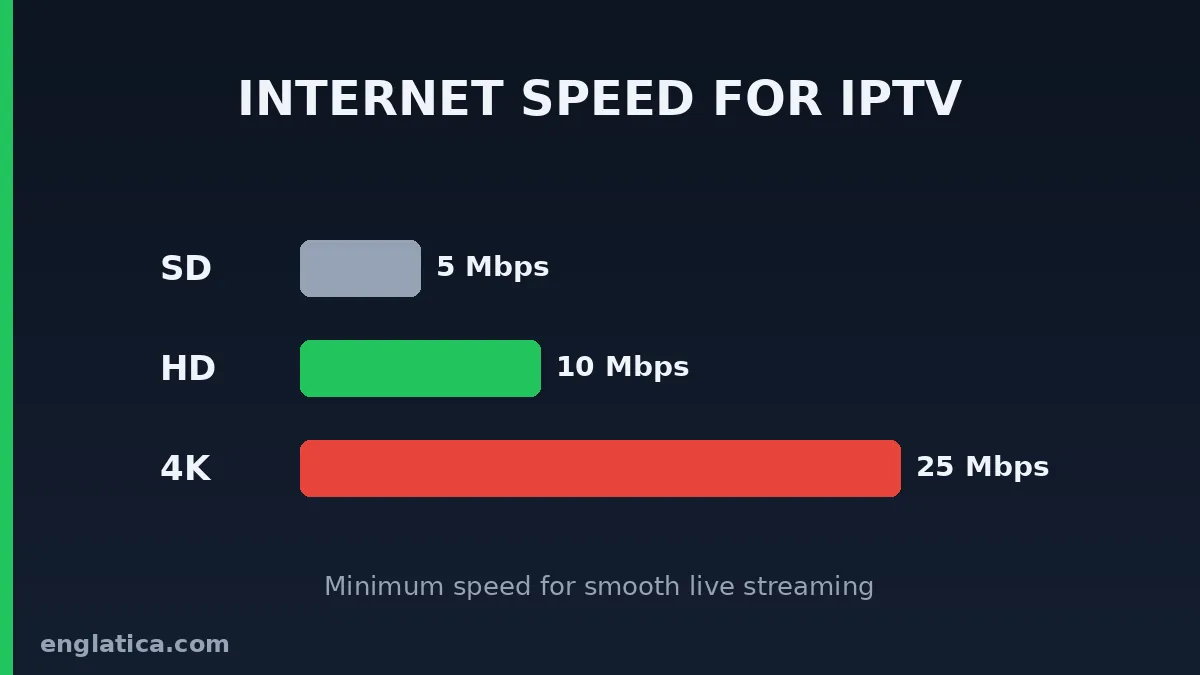
| Stream Quality | Minimum Speed | Comfortable Speed |
|---|---|---|
| SD | 5 Mbps | 10 Mbps |
| HD (720p/1080p) | 10 Mbps | 15 Mbps |
| 4K | 25 Mbps | 35 Mbps+ |
Run a quick speed test before kickoff, and see our best devices for IPTV if your box keeps struggling. If you are miles above these numbers and still buffering, the problem is the server or throttling, not your line.
When It Is the Provider, Not You
Sometimes you do everything right and the match still stutters. That is the tell of a weak provider.
Good IPTV services run enough servers to handle kickoff traffic and load-balance during big matches. Cheap ones fall over the moment a Premier League game starts.
Signs your provider is the weak link:
- Buffering only on popular live matches, never on films.
- Lag at the exact same time every weekend.
- Other people on forums complaining about the same channels.
If that is you, no amount of cache-clearing will save the stream. You need a provider built for live sport.
Tested Device-Specific Fixes for IPTV Buffering During Live Football
The box you watch on changes the fix. Here is what actually matters per device.
Firestick and Fire TV
The cheaper Firesticks run low on memory fast. Close background apps before kickoff. Go to Settings > My Fire TV > About and check for updates, then force-stop anything you are not using. A Firestick 4K Max handles live sport far better than the basic stick if you are due an upgrade.
Android TV Boxes
Cheap Android boxes often ship with a weak WiFi chip. If yours buffers even on Ethernet, the box itself may be the bottleneck. Reboot it weekly and keep at least 1GB of internal storage free so the player has room to buffer ahead.
Smart TVs
Built-in apps on Samsung and LG TVs are slower than a dedicated box. If your smart TV struggles with live matches, a small streaming box plugged into HDMI usually fixes it outright.
Proven Pre-Match Routine: Stop Buffering Before Kickoff
Prevention beats panic. Run this quick routine before any big match and you will dodge most buffering during live football entirely.
- Reboot your router an hour before kickoff so it comes back fresh.
- Plug in Ethernet or move your box within line of sight of the router.
- Clear the app cache so the player starts clean.
- Run a speed test and confirm you are above 25 Mbps for a 4K stream, which lines up with standard 4K streaming requirements.
- Open the channel five minutes early so the stream is warm and stable before the whistle.
Two minutes of prep saves you missing the opening goal while you fight a spinning wheel.
Common Buffering Myths That Waste Your Time
Plenty of advice floating around does nothing. Skip these.
- “Buy a faster broadband package.” If you already have 50 Mbps, more speed will not help. The bottleneck is the server or WiFi, not your line.
- “Reinstall the app every time.” A cache clear does the same job in seconds without you re-entering your login.
- “Buffering means you got scammed.” Not always. Test the other fixes first before you write off a provider.
Spend your energy on the fixes that move the needle: connection, cache, and provider quality.
Quick Recap
- Ethernet first. It fixes most match-day lag.
- Restart the router and box.
- Clear the cache weekly.
- VPN if you suspect throttling.
- Lower the quality if your line is weak.
- Still buffering on live football? The provider is the problem.
Ranked Troubleshooting Table: Symptom to Fix
Match the symptom to the fix and skip straight to what works.
| Symptom | Most Likely Cause | First Fix to Try |
|---|---|---|
| Buffers only at kickoff | Server overload | Lower quality, or switch provider |
| Buffers every weekend evening | ISP throttling | Turn on a VPN |
| Buffers on WiFi, fine on data | Weak WiFi signal | Plug in Ethernet |
| Freezes then catches up | Not enough buffer / slow box | Clear cache, restart box |
| Films fine, football lags | Provider peak-load limits | Switch to a sports-ready provider |
Frequently Asked Questions
Which IPTV provider is best for buffer-free live football?
Look for a provider that specifically advertises dedicated sports servers and load balancing during peak hours. The best ones offer a free trial so you can test a live match before you pay. If a service will not let you trial it on a busy Saturday, that tells you something. Englatica runs dedicated sports servers built specifically for heavy match-day load, so your stream holds steady when everyone else piles on at kickoff. Start your free Englatica WhatsApp trial and test it live during this weekend’s biggest game.
Is a free trial enough to test for football buffering?
Yes, if you use it right. Do not test at a quiet 11pm. Load a popular live match at peak time, ideally a weekend kickoff, and watch for 15 minutes. This matters most for big events like the 2026 World Cup. A provider that stays smooth under that load is one worth keeping.
Why does my current IPTV buffer only during matches but not films?
Because live sport hits the server all at once while films are spread out through the day. If films play fine but football stutters, your provider cannot handle peak load. That is a hardware-and-capacity problem on their end, and the only real fix is switching to one built for live traffic.