IPTV meaning is simple: IPTV stands for Internet Protocol Television. It is a way of delivering television and video through an IP network instead of relying only on a traditional antenna, satellite dish, or coaxial cable. In everyday language, people usually use the term for live TV and on-demand content watched through an internet-connected device.
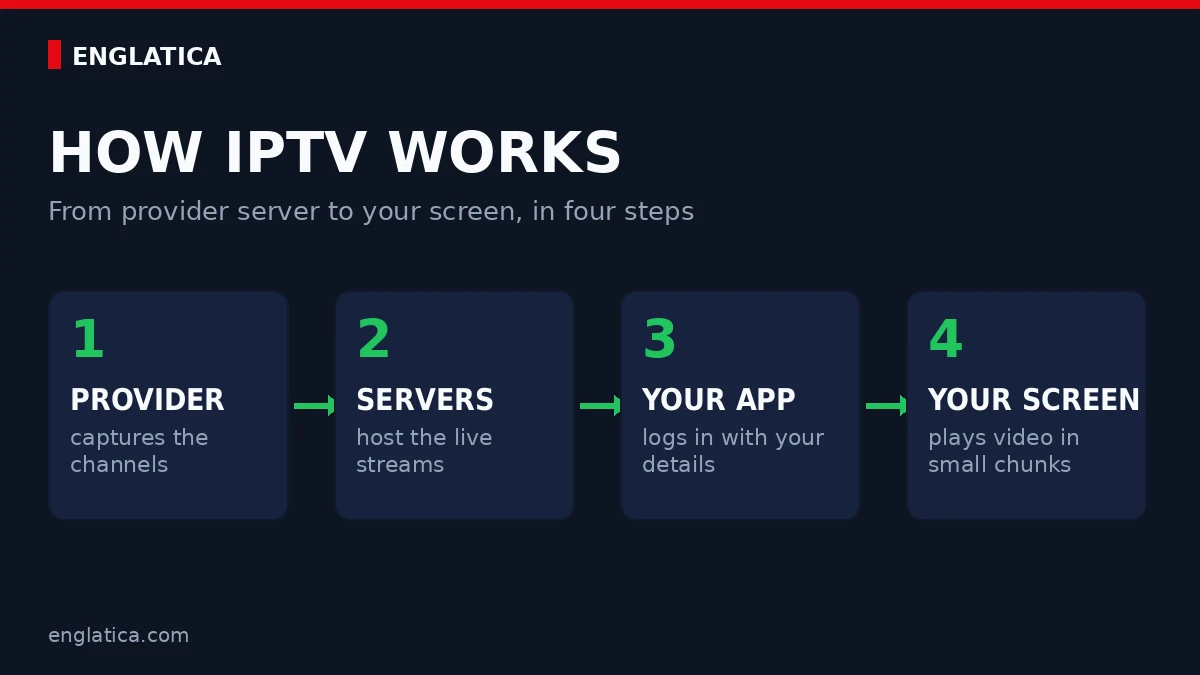
IPTV = Internet Protocol Television. A provider sends TV content as digital data over an IP network, and an app, smart TV, set-top box, phone, or computer receives and plays that stream. In short, this IPTV meaning describes the delivery method, not the legal status of a particular provider.
What Does IPTV Mean?
IPTV meaning comes directly from the words Internet Protocol Television. “Internet Protocol” is the family of networking rules used to move data between connected devices. “Television” is the content being delivered. Put the two together, and IPTV means television distributed using IP-based networking. For readers who want IPTV explained without jargon, that is the essential idea.
There is one useful detail that many quick definitions skip. In formal telecom standards, IPTV is more specific than “any video you watch online.” The International Telecommunication Union (ITU) describes IPTV as multimedia delivered over IP-based networks that are managed to support quality, reliability, security and interactivity. This formal IPTV definition emphasises a controlled and dependable delivery environment.
In normal consumer conversations, though, the phrase is used more broadly. If someone asks about the IPTV meaning on a Smart TV or Firestick, they are usually talking about watching live television channels or a video library through an internet connection and an IPTV-compatible app.
Technically, “IPTV” can refer to a managed TV delivery system. In everyday search language, it often means internet-delivered live TV. Understanding both meanings makes the rest of the topic much less confusing, and that distinction is central to IPTV meaning in 2026.
How Does IPTV Work?
IPTV works by turning television content into digital streams, sending those streams over an IP network, and letting your device decode and display them. You select a channel or programme, the service delivers the requested stream, and your player keeps receiving small pieces of data while you watch. This operational IPTV meaning explains why the player and network are both essential.
This is why your internet connection matters. IPTV does not arrive through a separate TV signal in the same way as a traditional satellite dish. Your network becomes part of the viewing path. A weak Wi-Fi signal, an overloaded home network, an unstable internet connection, or a poor-quality source can all affect playback. In practical IPTV meaning terms, the home network is part of the television system.
The basic idea is still straightforward: you request content, the service sends it as IP data, and your player turns that data back into picture and sound. That is the practical IPTV meaning behind the acronym.
What Are the Main Types of IPTV?
The main IPTV formats are live television, video on demand, and time-shifted or catch-up viewing. They all use IP delivery, but they differ in when the content becomes available and how much control the viewer has over the schedule. This is why IPTV meaning can include more than a live channel list.
Live IPTV
Live IPTV follows a schedule. You open a channel and join whatever is being shown at that moment, much like traditional broadcast television.
Video on Demand
VOD lets you choose a film, episode, documentary or other programme from a library and start it when you want.
Catch-Up / Time-Shifted TV
Catch-up features let you watch recently aired programmes after their original broadcast time, when the service supports replay.
Not every IPTV service includes all three. Some focus mainly on linear live channels, while others combine live TV with an on-demand catalogue. If you are comparing services, check the available channel and content options instead of assuming every provider has the same library.
Is IPTV the Same as Streaming?
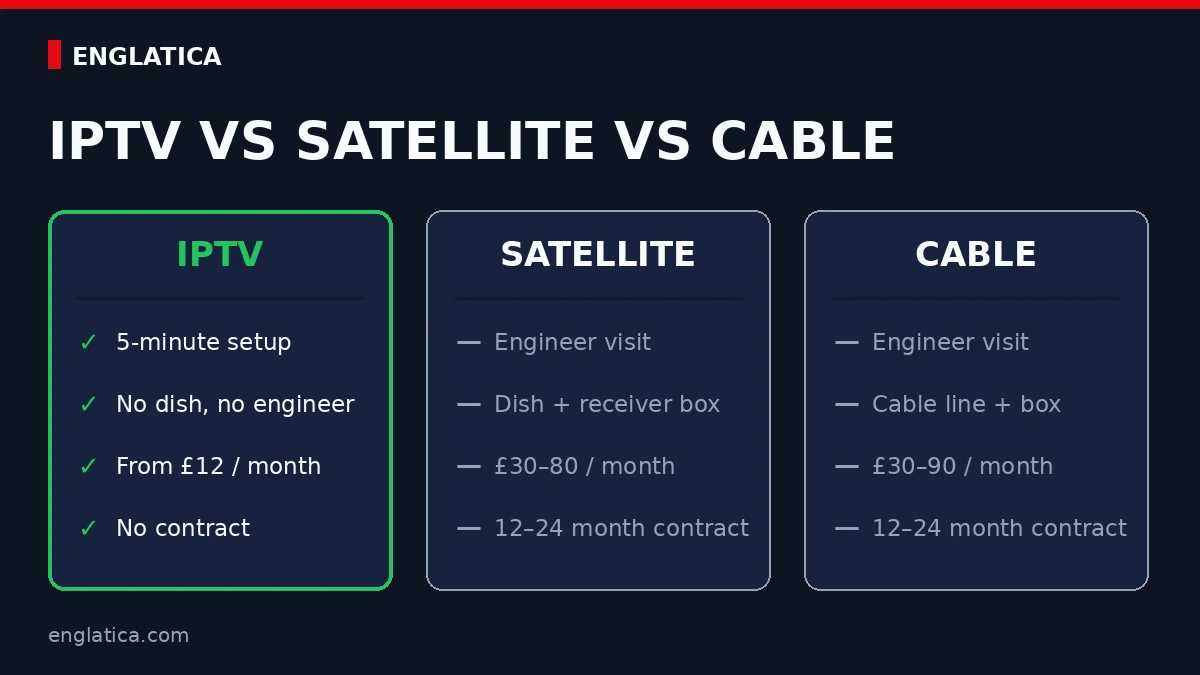
IPTV is a form of network-delivered video, so it uses streaming technology, but the words are not always interchangeable. “Streaming” is the broader term. IPTV usually refers to television-style delivery over IP, while OTT streaming services send video over the open internet without necessarily using a managed IPTV network. Understanding this IPTV meaning helps separate television-style services from the wider streaming category.
| Feature | IPTV | OTT Streaming | Traditional Cable / Satellite |
|---|---|---|---|
| Delivery | IP-based network | Open internet | Cable, satellite or broadcast infrastructure |
| Typical experience | Live TV + VOD + TV guide | On-demand video, live streams or both | Scheduled channels + provider features |
| Internet required | Yes | Yes | Not always for the core TV signal |
| Common devices | Smart TV, set-top box, Fire TV, Android, phone, computer | Smart TV, phone, tablet, browser, streaming device | TV + operator receiver or built-in tuner |
Live, on-demand and catch-up viewing share the same foundation even though the viewer experience is different. The broader IPTV meaning therefore covers both scheduled television and content selected at a convenient time.
That distinction is useful because the phrase IPTV meaning is often treated online as if it were simply another word for Netflix-style streaming. The technologies overlap, but the service models are not always the same. In a strict standards-based definition, IPTV puts more emphasis on managed delivery and quality of service.
What Do You Need to Use IPTV?
To use IPTV, you generally need a stable internet connection, a compatible device, a player or app, and access details from a legitimate service. You do not necessarily need a special “IPTV box” if your Smart TV, streaming stick, phone, tablet or computer can run the required player. A practical IPTV meaning guide should always connect the definition to these real setup requirements.
1. A stable connection
Streaming quality depends on more than headline download speed. Wi-Fi strength, network congestion and stability matter too, especially on higher-resolution streams.
2. A compatible device
Common choices include Smart TVs, Fire TV devices, Android TV boxes, phones, tablets and computers.
3. A player or app
The player is the software that organizes channels or on-demand content and decodes the stream for your device.
4. Service access
Your provider supplies the access method used by the player. The exact setup depends on the app and service.
If you are new to the technology, the easiest way to understand the IPTV meaning in practice is to test the whole setup on the device you actually plan to use. Englatica currently offers a 24-hour IPTV free trial, which can be used to check compatibility and playback before choosing a paid plan.
What Does IPTV Mean on a Smart TV or Firestick?
On a Smart TV or Firestick, IPTV usually means using an app to receive live TV or on-demand streams through your internet connection. The television or streaming stick acts as the playback device; the IPTV app handles the channel list, programme guide and stream playback. This device-level IPTV meaning is the version most viewers meet during setup.
You may see terms such as M3U, Xtream credentials, portal URL, EPG or playlist while setting up a player. These are not different meanings of IPTV. They are simply different methods or data formats used by apps and services to organize and access content.
A useful way to think about it is this: the TV is the screen, the app is the player, your internet is the delivery path, and the service provides access to the content. That simple IPTV meaning makes unfamiliar setup terms easier to understand.
Is IPTV Legal?
IPTV technology itself is not inherently illegal. The legal issue is whether a service has the rights and permissions needed to distribute the channels, films, programmes or other content it offers. A legitimate broadcaster, telecom operator or licensed streaming provider can use IP delivery lawfully. The IPTV meaning describes a technology; it does not certify the licensing of every service that uses the label.
Rules vary by country and by service type. In the UK, Ofcom explains internet-delivered television and IPTV and notes that regulatory treatment can depend on how a service is delivered and whether it appears on a regulated electronic programme guide. On-demand services can also fall under separate rules. Legal IPTV meaning questions must therefore be separated from questions about the technology itself.
Do not judge legality from the word “IPTV” alone. The technology is neutral. What matters is the source of the content, the provider’s rights, and the laws that apply where the service operates and where you use it.
Why Do People Use IPTV?
People choose IPTV because it can bring live television and on-demand viewing into the same internet-connected setup. It can also make TV accessible on more than one type of device, which is useful for households that no longer want all viewing tied to a traditional receiver. In that context, IPTV meaning is closely connected to flexibility across screens.
The practical advantages depend on the provider and app rather than on the acronym itself. A good service should be easy to navigate, work reliably on your device, provide clear support, and be transparent about what is included. A long channel list means very little if the channels you actually watch are hard to find or unreliable.
That is also why testing matters. The most useful question is not “Does IPTV work?” in the abstract. It is “Does this specific service work well on my internet connection, my device, and the channels I care about?” You can review Englatica’s IPTV FAQ for practical service questions before getting started.
IPTV Meaning and the Setup Terms You May See
Once the basic IPTV meaning is clear, the vocabulary used by players and providers becomes easier to understand. Most setup terms describe either the channel list, the programme guide, the login method or the technology that moves video to your screen. They are parts of an IPTV setup, not separate television services.
| Term | Plain-English meaning | Why it matters |
|---|---|---|
| M3U playlist | A text-based list containing channel names and stream locations. | A compatible player can import it to organise authorised channels. |
| EPG | An electronic programme guide showing current and upcoming programmes. | Correct channel identifiers help the guide match the right listings. |
| Portal URL | A server address used by certain set-top boxes and middleware systems. | The player needs the correct address and authorised account details. |
| Xtream-style login | A server address, username and password entered separately in a supported app. | It can be simpler to type than one long playlist link. |
| VOD | Video on demand, such as films or programmes selected from a library. | It is different from joining a live channel already in progress. |
| Catch-up | A replay feature for programmes that aired recently. | Availability depends on the channel, provider and account. |
You may also see words such as codec, bitrate, buffer and CDN. A codec compresses and decodes video; bitrate describes how much data the stream uses; buffering stores a small amount of video before playback; and a content delivery network distributes traffic across servers. These concepts affect quality and reliability, but they do not change the core IPTV meaning.
Treat login information as private. A playlist address may contain a username, password or renewable token inside the URL. Do not post it in public forums, screenshots or review comments. If access details are exposed, contact the authorised provider and ask whether they should be replaced. Security is part of understanding IPTV meaning in real-world use.
How to Evaluate an IPTV Service Safely
Understanding IPTV meaning explains the delivery technology, but it does not tell you whether a specific service is reliable, licensed or suitable for your device. Evaluate the provider separately and avoid judging quality by channel count or promotional claims alone.
Check transparency
Look for clear contact information, plan terms, supported devices and an explanation of what happens if a channel or feature changes. Vague ownership and impossible promises are warning signs.
Confirm content rights
A low price does not prove that distribution is authorised. Consider the provider’s licensing claims, the markets it serves and whether the offer appears realistic for the content included.
Test your real device
Use the television, app and home connection you plan to keep. Test live playback, channel changes, search, subtitles and the programme guide at the times you normally watch.
Protect payment and account data
Use a secure payment method, avoid sharing unnecessary personal data and choose a unique password where an account password is required. Read renewal and cancellation terms before paying.
A short compatibility test can answer practical questions that a sales page cannot. It shows whether Wi-Fi reaches the television, whether the chosen app handles the playlist correctly and whether navigation feels comfortable. A useful IPTV meaning guide should lead to informed testing, not an automatic purchase.
IPTV Troubleshooting: A Fast Diagnostic Order
When playback fails, change one variable at a time. Randomly reinstalling apps, replacing playlists and rebooting every device together can hide the cause. The following order separates home-network problems from app, account and provider problems more efficiently. A complete IPTV meaning guide should explain this delivery chain as well as the acronym.
- Test another app or ordinary website. If everything on the device is slow, the problem is probably the connection or Wi-Fi rather than the IPTV service.
- Move closer to the router or test Ethernet. A wired test removes wireless interference from the diagnosis. If Ethernet works smoothly, improve router placement, Wi-Fi coverage or network congestion.
- Restart only the affected player. Close it fully, reopen it and refresh the channel list or EPG. This clears temporary app state without changing working account details.
- Compare live TV and on-demand content. If only one channel fails, the issue may be that source. If every section fails, check the login, subscription status and provider availability.
- Record the exact error. Note the device, app, time, channel and message before contacting support. Useful evidence is safer and faster than sending screenshots that expose credentials.
The practical IPTV meaning includes several connected parts: the content source, provider infrastructure, internet connection, home network, app and playback device. A fault in any one part can interrupt viewing, so diagnosis should follow the chain instead of blaming the first screen you see.
Buffering is not always a speed problem. Packet loss, unstable Wi-Fi, an overloaded server, a high-bitrate stream or limited device memory can produce similar symptoms. Test a lower-resolution stream and a different device on the same network before deciding which part needs attention. This diagnostic approach turns IPTV meaning into a useful model for finding faults.
IPTV Meaning in One Sentence
IPTV means Internet Protocol Television: television and video delivered through an IP-based network to an internet-connected device instead of relying only on traditional broadcast, cable or satellite delivery.
This one-sentence IPTV meaning is the foundation for the rest of the guide. If you only remember one thing, remember that. Live channels, VOD, apps, playlists, TV guides and device compatibility all sit on top of that basic idea.
Try IPTV Before You Commit
Test playback, navigation and device compatibility on the connection you already use at home.
IPTV Meaning FAQ
What does IPTV stand for?
IPTV stands for Internet Protocol Television. It describes television or video services delivered using IP networking. Instead of depending only on a satellite, cable line or terrestrial broadcast signal, the content is sent as digital data to a compatible internet-connected device.
What is the simple meaning of IPTV?
The simple IPTV meaning is “TV delivered through internet networking.” You choose a live channel or on-demand programme, the service sends a digital video stream to your device, and an app or receiver decodes it so you can watch it on screen.
Is IPTV the same as Netflix or other streaming apps?
Not exactly. Both use internet-based video delivery, but “streaming” is a broader category. IPTV usually describes television-style services delivered over IP, often with live channels, a TV guide and VOD. OTT services are commonly delivered over the open internet and may follow a different technical model.
Do I need a special box for IPTV?
No. A dedicated set-top box is one option, but many people use IPTV on a Smart TV, Fire TV device, Android TV box, smartphone, tablet or computer. What matters is whether the device supports a compatible player and can maintain a stable network connection.
Is IPTV legal to use?
The technology itself is legal. Legality depends on the provider, the rights attached to the content and the law in your jurisdiction. Licensed broadcasters and legitimate services can use IPTV technology, while unauthorized redistribution of copyrighted programming can create legal problems.
Does IPTV work without internet?
IPTV needs an IP network connection to receive the stream. For most home users, that means an internet connection. If the connection drops, live playback can stop or buffer because the device is no longer receiving the data needed to continue the stream.