An IPTV editor is a tool that tidies up a playlist. It renames channels, builds groups, strips duplicates, fixes logos and matches guide data, then writes a fresh M3U file your player can actually read. What it does not do is supply channels, and it does not give you the right to watch anything you were not already entitled to watch.
The first list I ever tried to clean had just over 4,000 lines and eleven groups that were all some variation of “SPORTS”. I bulk-deleted what looked like duplicates and lost about sixty channels I wanted, because two feeds with the same name were not the same stream. This is the process I use now, in order, with the mistakes that cost me the most time marked along the way. It applies to any IPTV editor: desktop app, browser tool or plain Notepad.
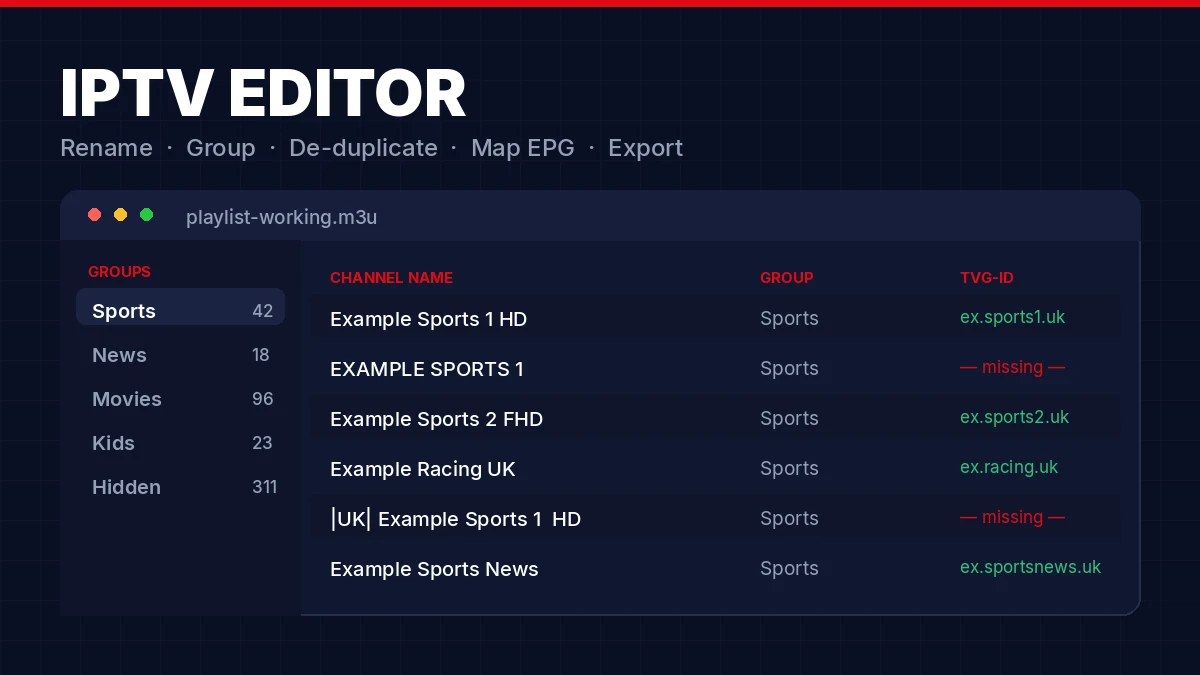
Quick Answer: An IPTV editor organises an M3U playlist you are already authorised to use. Work on a copy, remove duplicates by URL rather than by name, standardise the naming, build a small group structure, match every tvg-id to your XMLTV guide, then export a ten-channel test file before you replace the working list.
What does an IPTV editor actually do?
An IPTV editor is a playlist manager. It opens an M3U file or a provider playlist URL, shows the entries as an editable list, and lets you rename, reorder, group, hide, de-duplicate, attach logos and map guide identifiers. Then it writes a clean file back out. It never supplies the channels themselves.
The distinction that trips people up is IPTV editor versus player. The editor prepares the list; the player loads that list and opens the streams. Some apps do both, which blurs the line, but they are separate jobs and they fail in separate ways. If a channel plays from your untouched playlist and not from your edited one, the problem is the edit. If neither works, the IPTV editor was never involved.
| Tool | Its job | Provides channels? | What comes out |
|---|---|---|---|
| IPTV editor | Organise metadata and guide mappings | No — you supply an authorised list | M3U, M3U8 or a managed URL |
| Player | Display channels and open streams | Normally no | Playback, favourites, history |
| EPG utility | Collect and filter programme listings | Listings only, subject to rights | XMLTV or similar |
| Provider panel | Manage your authorised account | Depends on the provider | Credentials and playlist URL |
New to the terminology? Start with our explainer on how IPTV works and what a playlist is. One rule sits above all the others here: edit only playlists you own or are authorised to use. No editor can turn an unauthorised source into a legal one.
How does an IPTV editor read M3U and M3U8 files?
It parses two lines per channel. The #EXTINF line carries the metadata — tvg-id, tvg-name, tvg-logo, group-title and the display name after the comma. The line directly underneath carries the stream URL. Every field an IPTV editor shows you comes from those two lines.
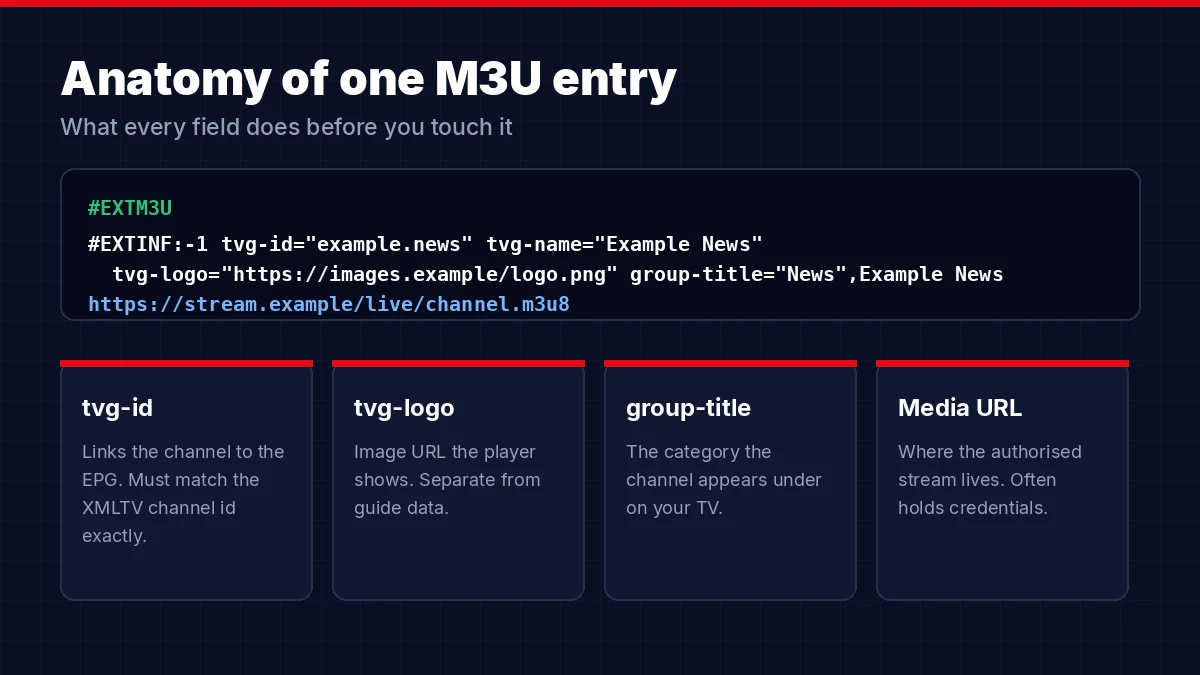
#EXTM3U
#EXTINF:-1 tvg-id="example.news" tvg-name="Example News"
tvg-logo="https://images.example/logo.png" group-title="News",Example News
https://stream.example/live/channel.m3u8
That example uses placeholder domains and contains no working stream. M3U8 usually means the same structure saved as UTF-8, though the extension also turns up on HTTP Live Streaming manifests, which is a different thing entirely and worth checking before you assume a conversion is needed.
- tvg-id — the join key between your playlist and the programme guide
- tvg-name — a guide-friendly name, not always the same as the display name
- tvg-logo — an image URL, completely independent of guide data
- group-title — the category the channel appears under on your TV
- Media URL — where the authorised stream lives, and often where your credentials live too
Players do not all accept the same attributes. If you see a field you do not recognise, leave it alone. It may control catch-up, a required user-agent or something provider-specific. A decent IPTV editor shows unknown attributes rather than quietly dropping them, and that behaviour alone is worth testing before you commit to a tool. Any m3u editor works on those same two lines, whether it shows you a spreadsheet-style grid or the raw text. If your list came from an Xtream Codes login rather than a plain M3U file, the same fields apply once the panel generates the playlist.
What is the safest IPTV editor workflow?
Nine steps, run on a copy, one change type at a time. The order matters more than which IPTV editor you pick: permission first, backup second, then structural edits, then guide matching, then a small test export. Skipping the backup is the mistake that costs entire evenings, and I have made it more than once.
- Confirm permission and set a goalUse a playlist from an authorised provider or a source whose terms allow what you are about to do. Decide what “better” means: fewer groups, consistent names, working guide data, or faster navigation on one specific device.
- Save an untouched originalKeep a dated copy and mark it read-only if you can. If you only have a remote URL, note the provider’s reset procedure. Never assume an IPTV editor has unlimited undo — most do not.
- Open it locally firstLook at the raw file before you hand it to an online IPTV editor. If the URLs contain a username, password or token, that decides the tool question for you: offline or self-hosted.
- De-duplicate by URL, not by nameRegional variants, backup feeds and different resolutions often share a display name. Compare tvg-id, URL, group and quality, then keep one clearly labelled primary entry. This is the step that bit me.
- Standardise the namingStrip repeated country prefixes, stray pipes and inconsistent quality tags. Keep the distinctions that mean something (region, language, subtitles) and drop the ones that do not. Search and guide matching both improve immediately.
- Build a small group structureSix or seven groups your household genuinely uses beats forty near-empty ones. Put everything you are unsure about into a single hidden or archive group rather than deleting it. Any decent IPTV editor makes this a two-minute job.
- Match the guide identifiersAlign each tvg-id with the matching channel id in your XMLTV source. Name-based auto-matching is fast and regularly wrong, so spot-check current and next programme after every bulk mapping.
- Validate the syntaxEvery metadata line needs a media line under it, every quote needs a partner, and the file needs to stay UTF-8. A good IPTV editor flags malformed entries without opening the streams.
- Export a small test, then version itTen channels: one from each group, one with a logo, one with a guide match, one with an accent in the name. Test on the actual device, then scale up and save the export with a version number.
Bulk rename and bulk delete are where an hour gets saved or three hundred correct entries get destroyed. Preview the affected count before you confirm, change one thing at a time, and keep the backup somewhere outside the IPTV editor’s working folder so a bad save cannot reach it.
Should you use a desktop, online or self-hosted IPTV editor?
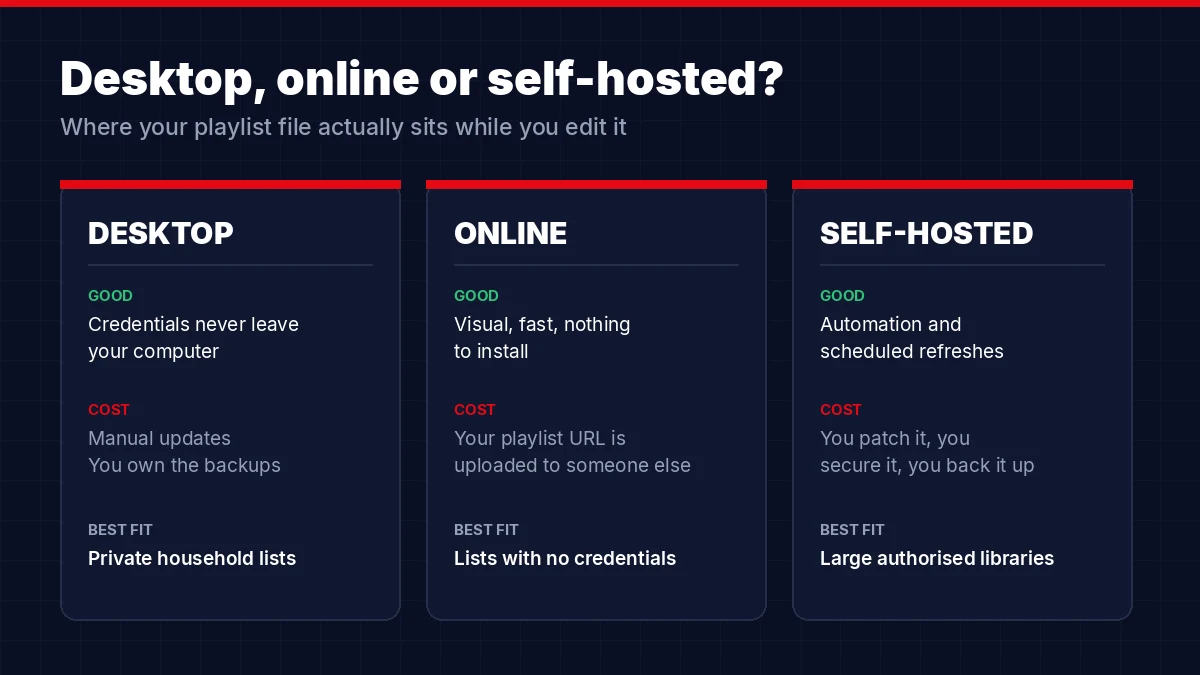
It depends almost entirely on whether your playlist URL contains credentials. If it does, keep the file on your own machine or your own server. If it does not, a browser-based tool is faster and there is little to lose. Channel count and how much automation you want decide the rest of the IPTV editor question.
| Type | What you gain | What it costs you | Best fit |
|---|---|---|---|
| Desktop / offline | Credentials never leave the machine; fast bulk edits; works without internet | Manual updates; OS limitations; backups are entirely on you | Private household lists |
| Online / cloud | Visual interface, nothing to install, shareable output | Your playlist data sits on someone else’s server | Lists with no embedded credentials |
| Self-hosted | Automation, scheduled refreshes, full control | You patch it, secure it and back it up | Large authorised libraries |
| Plain text editor | Transparent and precise; available everywhere | No validation; easy to break; painful past a few hundred lines | Small fixes and troubleshooting |
Before you paste a live URL into any online IPTV editor, find out what it stores, how long it keeps it, whether exported links are public to anyone holding the address, and how you delete the account. “Encrypted” on a landing page means nothing on its own. Ask what is encrypted in transit, what is encrypted at rest, and who can read it decrypted.
Open-source IPTV editor projects help here because you can read the code and the issue history, but that is transparency, not a security guarantee. Check release activity and get the software from the project’s own repository. Treat a free iptv playlist editor the way you would treat a free file converter: useful, but not somewhere to leave a password. Once your list is clean, our guide to IPTV Smarters Pro covers loading it on the player side.
Why is your programme guide empty after editing?
Because the player joins two separate files on one identifier, and the join broke. The tvg-id in your M3U has to match the channel id in your XMLTV file exactly. Rename a channel and nothing happens to the guide. Change the id, and the guide disappears for that channel alone. No IPTV editor can invent listings the XMLTV source does not contain.
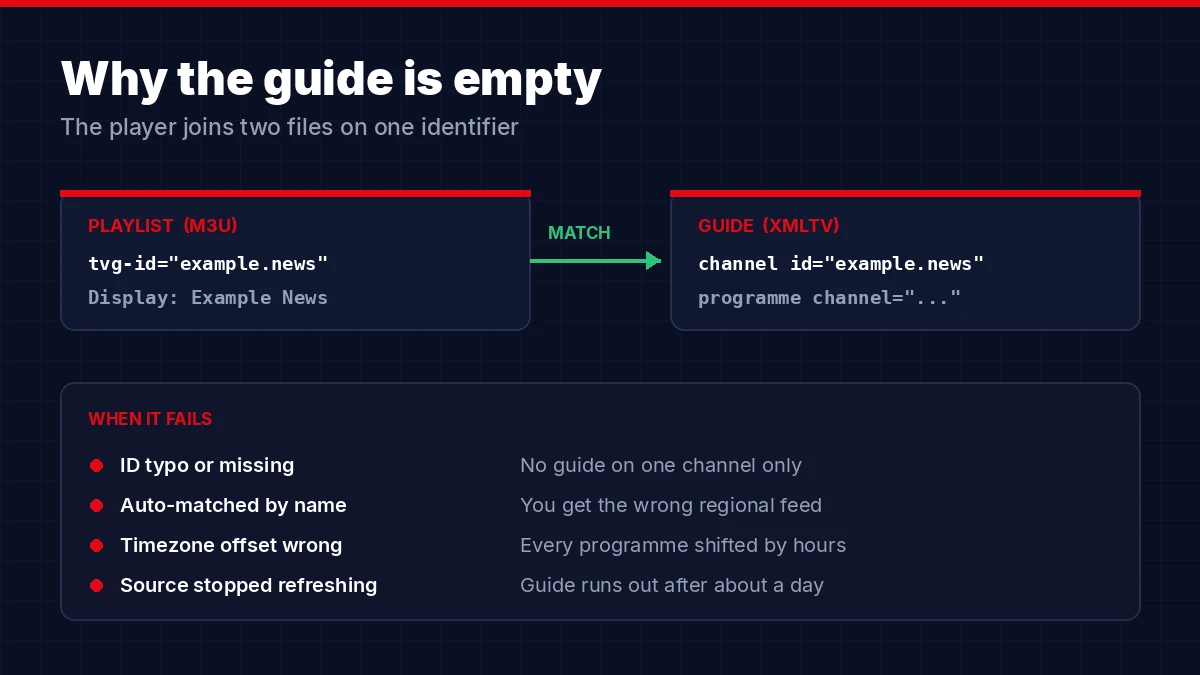
XMLTV is the mature XML format most guide sources use, and the XMLTV project on GitHub documents the structure. The pattern is simple once you have seen it: the playlist entry names an id, the XMLTV file declares a channel with that id, and every programme element points back at it.
| Symptom | Likely cause | What to check |
|---|---|---|
| One channel has no guide | Missing or mistyped tvg-id | Compare the M3U id and the XMLTV id character by character |
| Wrong region’s listings | Auto-match picked a similar name | Map the regional identifier by hand |
| Everything shifted by hours | Timezone or offset mismatch | Read the XMLTV timestamps before applying a global correction |
| Guide stops after a day | Source did not refresh, or the player cached it | Source update time, guide URL, player refresh interval |
| Logos fine, guide missing | Two unrelated fields | Treat tvg-logo and tvg-id as completely separate |
Only use listings you have permission to obtain and republish. Editing a channel name gives you no rights over the guide data attached to it, so keep the source terms filed with the project.
Is it safe to upload your playlist to an online IPTV editor?
Only if the URL holds no credentials. A remote playlist address often contains a username, password, API token or a signed path, and anyone who receives the full URL can use the account until that credential expires or gets reset. Treat the file the way you would treat a password.
- Redact the host, username, password and token before sharing anything publicly
- Never paste a live URL into an unknown converter site just to change a file extension
- Assume a short shareable playlist link is readable by anyone who has it
- Use a unique password on any editor account, never your email or hosting password
- Turn on multi-factor authentication where the tool supports it
- Delete abandoned exports, temporary files and old shared links after a migration
- If a URL leaks, ask the provider to reset it — deleting the message does nothing
- Patch self-hosted tools, containers and reverse proxies on a schedule
When you need help in a public thread, post https://example.com/get.php?username=REDACTED&password=REDACTED and nothing closer to the real thing. Rights matter as much as secrets: an IPTV editor is for organising sources you are authorised to use, not for stripping access controls or redistributing streams. GOV.UK explains that watching content without the copyright owner’s permission is illicit streaming.
What breaks a playlist on export, and how do you fix it?
Almost always a format assumption. Confirm what the destination player expects before you export: file or URL, M3U or M3U8, UTF-8 encoding, a separate guide URL, HTTPS logos, catch-up attributes and the connection limit on your plan. Then change one variable at a time when something fails.
| Problem | Usual explanation | Fix |
|---|---|---|
| Player shows an empty list | Bad header, wrong encoding or unsupported export type | Load a minimal known-good file and compare the first lines |
| Names appear but nothing plays | Expired credentials or a provider-side issue | Test the untouched original on the same device first |
| Groups vanished | Player ignores the attribute, or the editor removed it | Check group-title syntax and player support |
| Accents show as symbols | Wrong character encoding | Re-export as UTF-8 without touching the content |
| Duplicates come back | The remote source overwrites your local edits | Use a repeatable filter or a managed output URL |
| Logos disappeared | Blocked HTTP image or expired link | Point at stable, publicly reachable HTTPS images |
| IPTV editor crashes on a big list | Memory limit or slow parsing | Split the copy into chunks or move to a local tool |
Keep three files at all times: the original, the working copy and the last export that passed testing. Something like playlist-original-2026-08-05.m3u, playlist-working.m3u and playlist-v3-tested.m3u. It takes ten seconds and it is the difference between a rollback and a rebuild. If the fresh export refuses to load at all, walk back through our IPTV setup guide before blaming the edit.
Tested the untouched playlist and it still stalls? Then the edit was never the problem and no amount of tidying will fix it. The fastest way to know for certain is to run the same channels through a second source and watch them side by side.
Compare on a free trialOne thing never to do: fix an access error by borrowing credentials or stream URLs from someone else. Ask your provider to restore the account or reissue the playlist in the format you need.
IPTV Editor: Quick Answers to Common Questions
What does an IPTV editor do?
It organises a playlist. An IPTV editor can rename and reorder entries, create groups, remove confirmed duplicates, attach logos, map guide identifiers and export a compatible M3U file or managed URL. It does not provide channels and it does not grant any right to watch them.
Is using an IPTV editor legal?
Editing a playlist file is an ordinary technical activity. Legality depends on the source, the content rights and what you do with the result. Use only playlists and listings you own or are authorised to access, and do not bypass access controls or redistribute copyrighted streams.
What is the difference between M3U and M3U8?
Both are playlist formats. M3U8 normally means an M3U playlist saved as UTF-8, and the same extension is also used for HTTP Live Streaming manifests. Check what your player expects, because some apps treat the extension and the content type differently.
Can I edit an M3U file in Notepad?
Yes. M3U is plain text, so small corrections in any text editor are fine. Save as UTF-8, keep the #EXTM3U header first, keep every metadata line paired with its media URL, and work on a copy. For lists over a few hundred lines, a visual m3u editor is safer.
Why is my EPG not matching the channels?
The tvg-id in your playlist probably does not match the XMLTV channel id exactly, or an automatic match picked the wrong regional feed. Compare identifiers rather than display names, correct the mapping, then clear the guide cache in your player and refresh.
Can editing a playlist stop buffering?
No. Removing dead and duplicate entries makes a list faster to browse, but buffering comes from the server, your connection, your Wi-Fi or expired credentials. Test the untouched playlist and the edited one on the same device to see whether the edit is involved at all.
Is an IPTV editor worth the effort?
If you scroll past two hundred channels to reach the four you watch, yes. The work is dull and the payoff is permanent, provided you keep the original file and test before you replace anything.
Pick the IPTV editor that matches your privacy needs rather than the one with the best landing page. If an IPTV editor will not tell you where it stores your playlist, publishes unprotected export links, or silently deletes attributes it does not recognise, keep looking. For the hardware side of a clean setup, our rundown of the best devices for IPTV pairs well with a tidy list.
A clean playlist is easier when the source list is clean to begin with. Test ours before you commit.
Start Your Free Trial