An IPTV free trial 2 hours long is enough to reject a bad service and not enough to approve a good one. Two hours proves your credentials work, your device plays the stream and your channels load quickly. It cannot prove the part that decides everything, which is whether the servers hold up at nine on a Saturday evening.
What follows is the 120 minute plan we give people who want to test fast: what to open, in what order, and the three results that mean you should walk away. Our own trial runs for 24 hours rather than two, and the comparison section explains why that gap matters more than any channel count.
Quick Answer: An IPTV free trial 2 hours long is a sanity check, not a verdict. Use it to confirm the login works, the picture is clean and your main channels open in a few seconds. Peak evening stability, the thing that actually decides whether you keep paying, needs a longer trial.
What does a 2 hour IPTV free trial actually include?
A real test line on the same servers paying customers use: the full channel list, the VOD library, usually one connection at a time, and a clock that starts the moment the credentials are issued. Nothing is held back in a genuine free IPTV trial. The limits are the 120 minutes and the single device.
Delivery of an IPTV test line is either an Xtream Codes login with a server URL, username and password, or a single M3U link. Both arrive by WhatsApp or email, usually within a few minutes of asking. You paste them into a player, and the clock is running whether you are ready or not.
One thing worth watching from the first minute: if the trial catalogue looks smaller than the paid one advertised on the site, you are not testing the product you would be buying. A short trial should still be the whole service, just briefly.
- Credentials in minutes, no card details, no contract
- The same servers and the same catalogue as a paid line
- One stream at a time on most 2 hour trials
- A hard expiry, so plan the session before you ask for it
What should you test in the first 120 minutes?
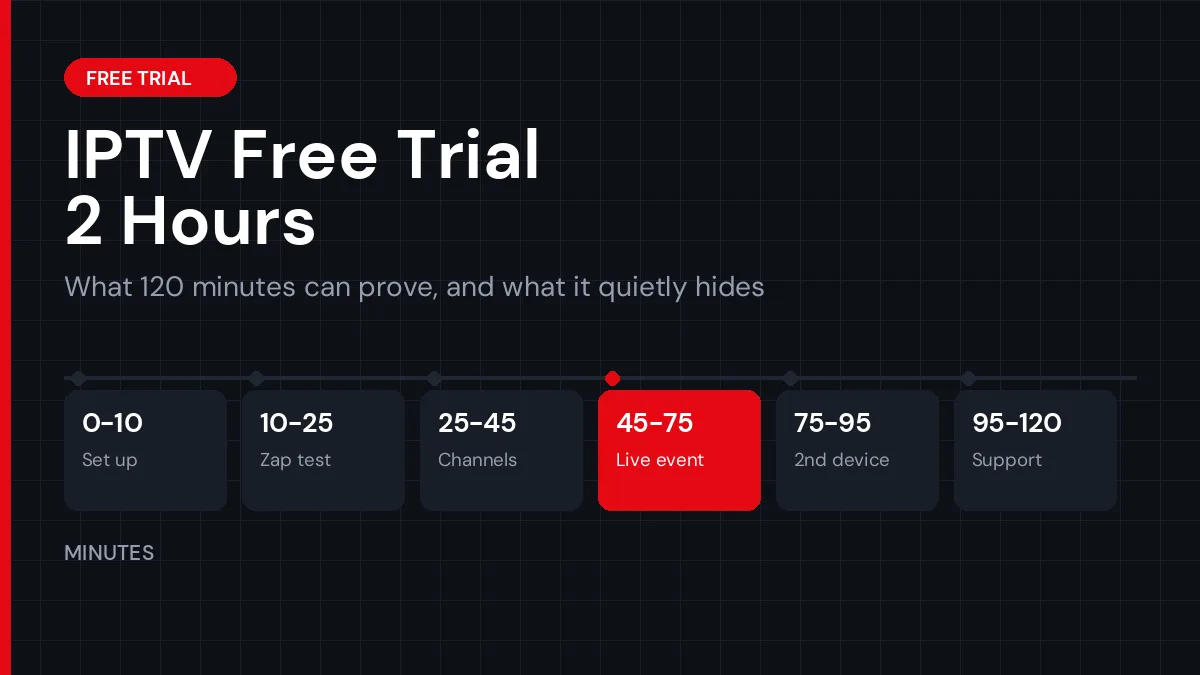
Work in blocks instead of improvising. Ten minutes to set up, fifteen to zap through channels, twenty on the ones you would actually watch, thirty on something live, twenty on a second device and the VOD library, and the last twenty five on the guide and on support. Random browsing wastes the window.
Set a timer on your phone for each block. It sounds excessive until the first time you look up and realise fifty minutes went into browsing a film library you were never going to buy the service for.
- 0 to 10 minutes: get inPaste the login into your player and note how long the provider took to answer in the first place. Slow support before they have your money rarely gets faster afterwards.
- 10 to 25 minutes: the zap testOpen twenty channels in a row and count the seconds to first picture. Under three is good. Over eight, repeatedly, means an overloaded server rather than a slow remote.
- 25 to 45 minutes: your channelsGo to the five or six you would genuinely watch. Thirty thousand channels are irrelevant if the two that made you sign up stutter or sit on a black screen.
- 45 to 75 minutes: leave something live runningPut a live match or news channel on and let it play while you carry on. Freezes almost never happen in the first minute, which is exactly why a quick look tells you nothing.
- 75 to 95 minutes: second device and VODTry a phone while the TV is still playing to see how the connection limit behaves, then open three or four films. A VOD library full of dead links is common and easy to miss.
- 95 to 120 minutes: guide and supportCheck that the EPG fills in with real programme names, then send support a specific question and time the reply. That answer is the service you are buying as much as the stream is.
Is a 2 hour trial enough to judge an IPTV service?
It is enough to reject one. Dead credentials, missing local channels, constant buffering on a strong connection and an empty VOD library all surface inside ten minutes. What a 2 hour trial cannot show you is the nine o’clock Saturday load, and that is the hour when weak services actually break.
Streaming capacity is not a fixed thing. A provider with thin servers looks perfect at three in the afternoon and falls apart when a popular match kicks off and everyone lands on the same channel. If your test window sits outside peak hours, you have tested the easy conditions and learned very little.
- Two hours proves: credentials, picture quality, channel load times, device compatibility, support speed
- Two hours hides: peak evening stability, weekend load, how the service behaves on day three
- Two hours at 3pm proves almost nothing about 9pm on a Saturday
There is a signal in the length itself. A provider that will only expose two hours of its service is either protecting thin capacity or protecting its trial pool from resellers, and from the outside those look identical. A short trial is not automatically a red flag, but the way a provider answers when you ask for a longer window usually is.
If the stream does stutter during your test, the cause is not always the provider. Our guide on buffering during live football separates a weak server from a weak connection, which is worth reading before you blame either one.
How do 2 hour, 24 hour and 48 hour trials compare?
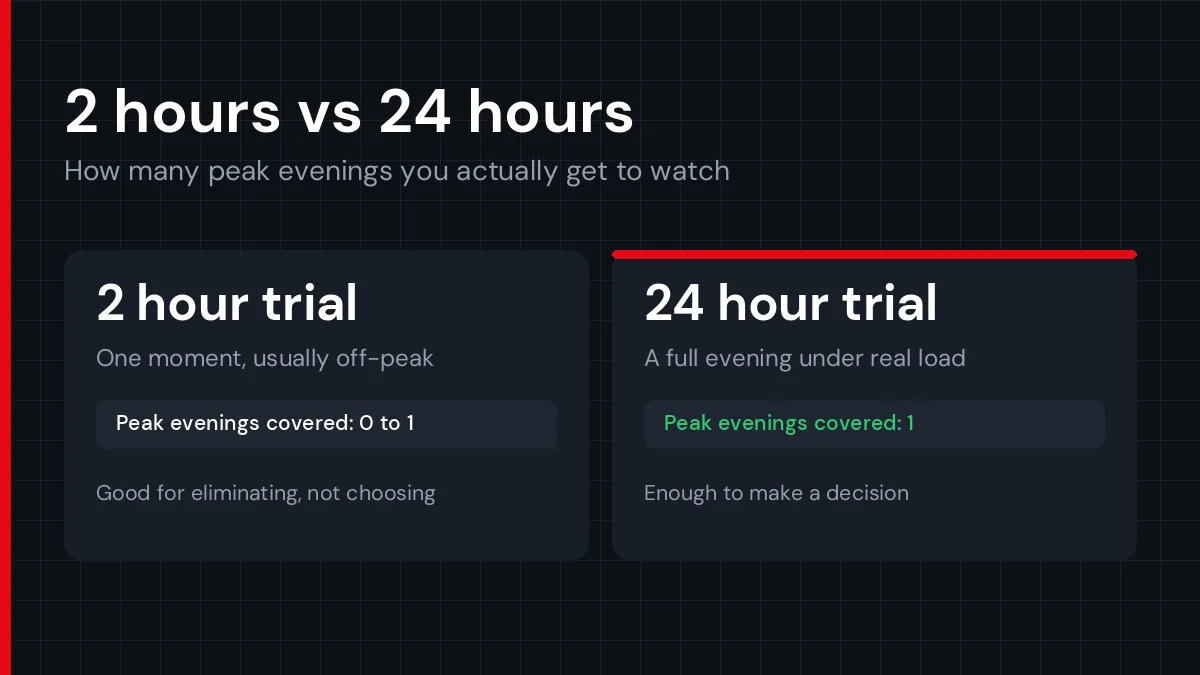
The difference is not generosity, it is how many peak evenings you get to observe. A short trial samples one moment. A day covers one evening. Two days let you check whether the first evening was luck. That is the entire argument, and it explains why longer trials come from providers with capacity to spare.
| Trial length | What it proves | What it misses |
|---|---|---|
| 2 hour trial | Login works, picture quality, load times, device support | Every peak hour, unless you time it perfectly |
| 24 hour trial | One full evening under real load, plus a second device | Whether that evening was typical |
| 48 hour trial | Two evenings, weekend sport, catch-up and guide over time | Long term consistency, which no trial shows |
| Paid month | Everything, including support after they have your money | Nothing, but you have already paid |
Most services in this market land somewhere between 24 and 48 hours. Our guide to IPTV trials goes deeper into what different windows are worth, and the free trial guide covers how to ask for one without handing over anything you should not.
How do you compare two trials in the same week?
Run them under the same conditions. Same channel, same hour, same device, ideally on consecutive evenings so the load is comparable. An IPTV free trial 2 hours long and a 24 hour trial are not the same test, so judge both on the window where they overlap rather than on total access.
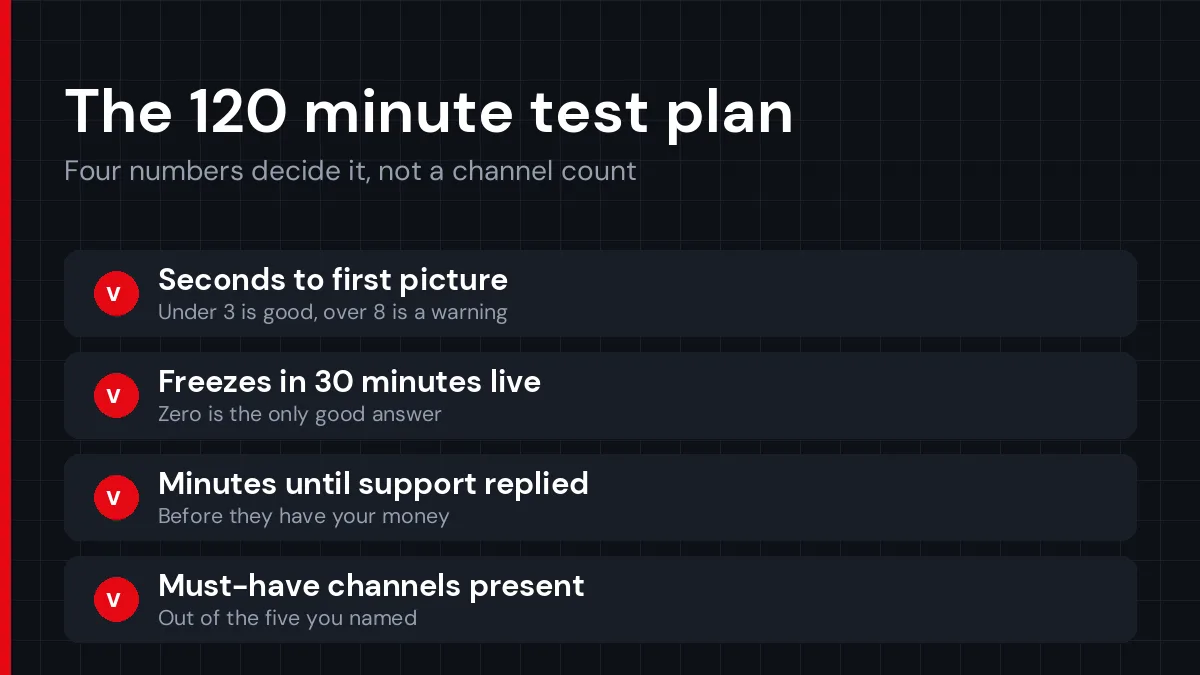
Keep a note per provider with four numbers: seconds to first picture on your main channel, freezes during thirty minutes of live viewing, minutes until support replied, and how many of your must-have channels were actually there. Four numbers beat a vague impression a week later, and they turn the decision into a one minute job.
Do not run three IPTV test lines at once on the same connection either. Simultaneous streams from different providers compete for the same bandwidth, and every one of them ends up looking worse than it is. Test them one at a time, even if that means spreading a 2 hour trial and a longer one across two evenings.
What should you set up before the clock starts?
Install the player, run a speed test and pick your moment. The FCC broadband guide puts HD video at 5 to 8 Mbps and 4K at around 25, so a connection that struggles will fail a service that works fine for everyone else. Get that out of the way first.
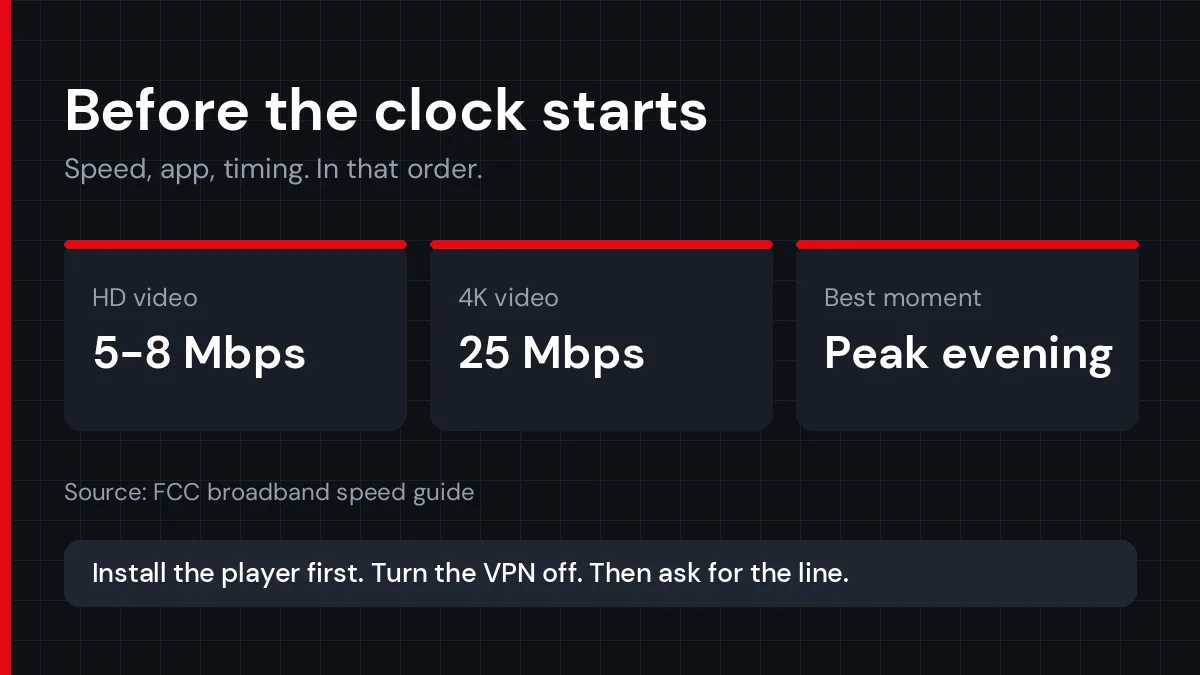
Then decide when to ask. Requesting a 2 hour trial at lunchtime on a Tuesday is the same as test driving a car in an empty car park. Ask for it when the service will be under load, ideally an evening or a weekend afternoon with live sport on.
Have the player installed before the credentials land. Losing twenty of your 120 minutes to sideloading an app is a self inflicted wound, and our Firestick setup walkthrough takes about ten minutes to follow the first time. Turn any VPN off for the test as well, so you are measuring the provider and not your tunnel.
What should you ask before they send the line?
Five questions, sent in one message, prevent most of the disappointment. Ask them before the clock starts, because a short trial is not the moment to discover the answers by accident.
- How many devices can stream at the same time on this line?
- Do you carry the specific channels I am signing up for?
- How do your servers behave during peak evening hours?
- Can this same line be upgraded to a paid plan, or do I start over?
- Is the trial the full catalogue or a reduced list?
The answers matter, and the speed of them matters just as much. A provider that takes six hours to reply to five simple questions during a 2 hour trial has already shown you what support looks like once you are a paying customer. One that answers in minutes and offers a 24 hour trial instead of a short one is making a different statement about its own servers.
Why do some providers only give 2 hours?
Cost and abuse control, mostly. Trial lines run on the same servers as paying customers, and a service handing out free access all week ends up feeding resellers who farm trials instead of selling. A short window keeps that under control, and for a small provider that is a reasonable business decision rather than a warning sign.
There is a less flattering reason too. A 2 hour trial issued at midday quietly ends before the evening rush, which is the exact stretch a struggling service would rather you never saw. You can neutralise that by choosing when you activate it.
Length also tracks the size of the operation. A large provider absorbs trial traffic without noticing, while a small one running a handful of servers feels every free line it hands out. Neither fact tells you anything about picture quality, which is why the test plan matters more than the hours on offer.
The pattern worth noticing is not the length by itself. It is a short trial combined with pressure to pay immediately, no visible way to judge the service and vague answers about how many connections you get. Any one of those is survivable. Together they are a decision.
What happens when the 2 hours are over?
The credentials stop working, and that is all. A genuine free IPTV trial has no card attached, so nothing charges automatically and nothing renews. If a provider asked for card details before giving you a free test, you already have your answer about how the rest of the relationship will go.
If you liked what you saw, ask for the same line to be upgraded rather than opening a new account. Most providers, ours included, can extend the exact line you tested, which means the channels and setup you just checked are the ones you keep.
Either way, keep your notes until you decide. Support can often reactivate the same IPTV test line for a few extra hours if you explain what you still want to check, which beats starting a fresh 2 hour trial somewhere else and repeating the whole exercise.
If you did not like it, write down why while it is fresh: which channels failed, how long they took to load, what support said. Two or three of those notes side by side make the next comparison quick, and they are far more useful than a channel count on a sales page.
IPTV free trial 2 hours: quick answers to common questions
Is a 2 hour trial long enough to test sports?
Only if you schedule it around a live match. Sport is where thin servers fail, so a trial that runs at a quiet hour tells you nothing about kick-off. Ask for the line shortly before a game you care about and leave that channel running for at least thirty minutes.
Do I need a credit card for an IPTV free trial?
No. A free trial should cost nothing and require no card, and most providers issue credentials over WhatsApp or email after a short message. If card details are requested before any access, that is a payment with a trial label on it, not a free test.
Can I get a second trial from the same provider?
Usually not on the same details, and asking repeatedly tends to get lines blocked. If the first window went badly through no fault of the service, such as a broken router at your end, explain that to support and most will extend it once rather than lose a customer.
Why did the stream buffer when my internet is fast?
Fast on a speed test is not the same as steady at the moment of playback. Wi-Fi congestion, distance from the router and the provider’s own server load all cause the same symptom. Test on a wired connection if you can, then compare the result to the same channel at a quieter hour.
How fast should channels open during a trial?
Under three seconds on a good line, and consistently so. Occasional slow channels are normal on any large list, but if most of them sit on a black screen for eight or ten seconds, the server is overloaded and the paid version will behave the same way.
Does Englatica offer a 2 hour trial?
No, ours runs for 24 hours. The reason is straightforward: a 2 hour window rarely covers a peak evening, and a peak evening is the only honest test of a streaming service. The trial is arranged on WhatsApp, needs no card, and gives the full channel and VOD library.
Can I check 4K quality during a short trial?
Yes, if your connection and screen allow it. Play a channel marked 4K for a minute, then compare it against the HD version of the same channel. The FCC puts 4K streaming at around 25 Mbps, so a line below that will blur the test rather than the service itself.
IPTV free trial 2 hours: the short version
Use an IPTV free trial 2 hours long to eliminate, not to choose. Run the 120 minute plan, time your channel loads, keep something live playing in the background, and pay attention to how fast support answers. If all of that holds, the only remaining question is what happens at peak hours.
That question needs a longer window, which is why we run a 24 hour trial instead. If you are still narrowing down providers, the free trial guide has the checklist for comparing two or three of them in the same week.
Our trial runs 24 hours, not 2. Test a full peak evening before you decide anything.
Start Your Free Trial